


This is an old revision of the document!
Detecting DDoS attacks, BotNet activity, and visits to specific resources using triggers in QoE
Triggers are used to search data in QoE Stor based on specified parameters. When a trigger fires, one of the following actions can occur:
- Notification in GUI
- HTTP action
- Email notification
Required SSG DPI options:
Required additional modules:
Example: configuring a trigger to detect the source of a Flood-type DDoS attack
General trigger information
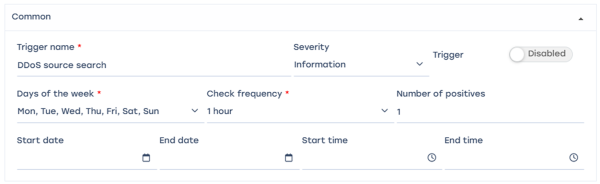
Trigger name: “DDOS source detection”, days of the week – all, check frequency – 1 hour, trigger activation frequency – once, start and end times not set.
Queries

- Add field
- Name: A
- Select table for scanning: Raw full netflow → Tables → Attacks detection → Top hosts IPs → Maxi
- Select period from “now – 15 minutes” to “now”
Conditions
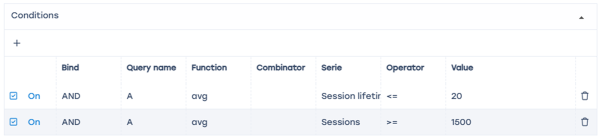
- Add two "+" fields
- Link – AND
- Function – avg
- Condition 1 – session lifetime <= 20 (ms)
- Condition 2 – number of sessions >= 1500
Error handling

- “If no errors” — no data
- “If there is an error or timeout” — save last state
Actions
E-mail action
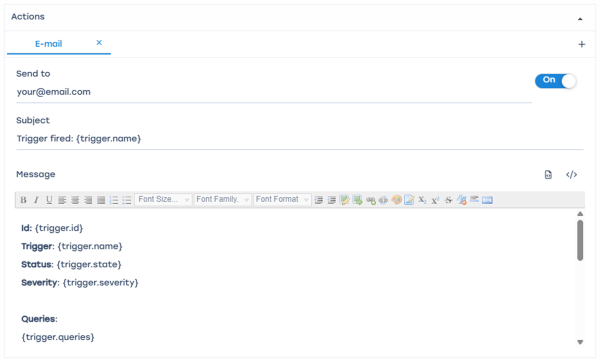
- Click the "</>" icon to auto-fill the form
- Enter the recipient email address in the “To” field
- When triggered, a notification will be sent to the specified email containing the trigger ID, name, status, and report link (saved state).
Notification
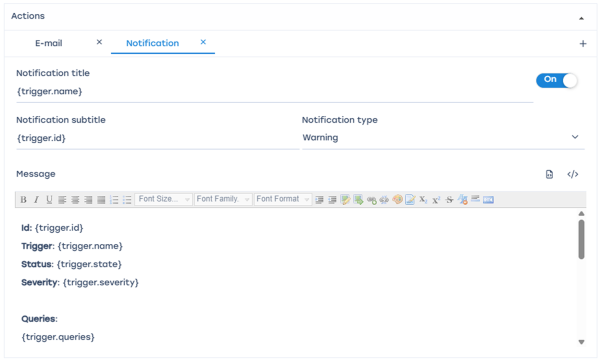
- Click "</>" to auto-fill the form
- Select notification type — “Warning”
- A notification will be created in the SSG system
The report link can be obtained from the notifications menu.
Select the notification Click Details
Follow the report link — it will open in a new browser window.
HTTP action
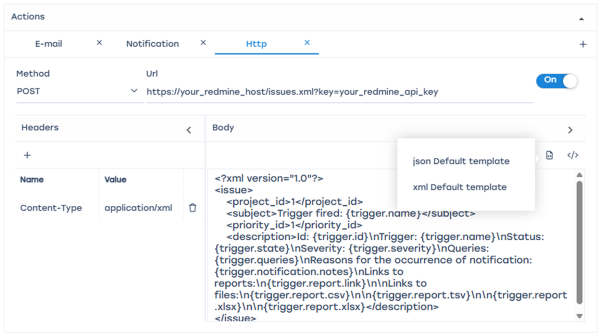
Click "</>" to auto-fill the form, select the method suitable for your ticket system, and enter the URL address.
Example: configuring a trigger to detect the target of a Flood-type DDoS attack
This configuration differs from the previous example in steps 2 and 3 (Queries and Conditions).
Queries
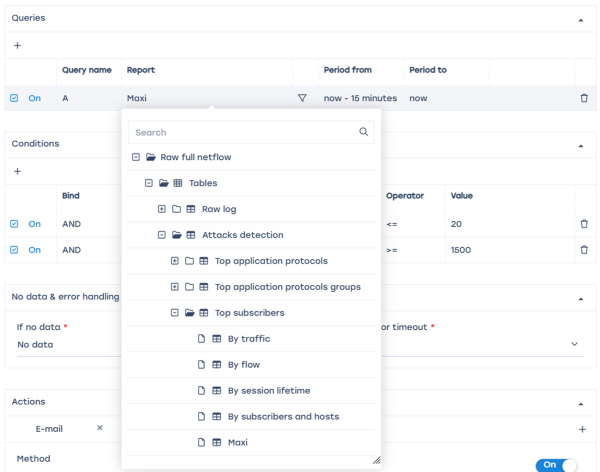
In the report field, select Raw full netflow → Tables → Attacks detection → Top subscribers → Maxi
Conditions

Series — “Flow volume to subscribers, Pct/s” >= 10000
BotNet analysis
This configuration differs from the previous example in steps 2 and 3 (Queries and Conditions).
Queries
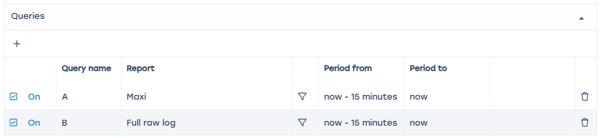
- Select Raw full netflow → Tables → Attacks detection → Top application protocols → Maxi for “A”
- Raw full network → Tables → Raw log → Full raw log for “B”
Conditions
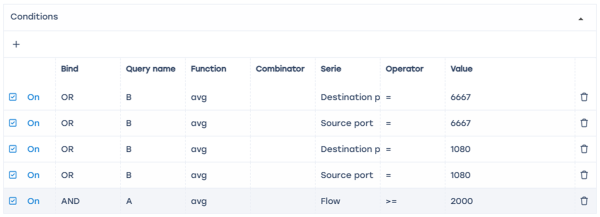
Since BotNet often uses ports 6667 and 1080 — add each destination/source port by selecting query “B” with “OR” condition, and Flow Pcts/s >= 2000.
Detecting subscriber visits to competitor resources
General trigger information
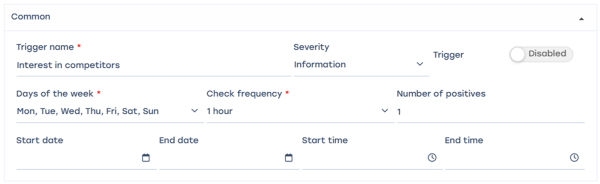
Trigger name: “Interest in competitors”, days of the week – all, check frequency – 1 hour, trigger activation frequency – once, start and end times not set.
Queries
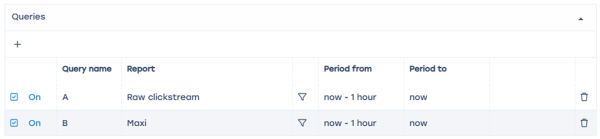
- Add “+” field
- Name A — select table: Raw clickstream → Tables → Raw clickstream
- Name B — select table: Raw full netflow → Tables → Attacks detection → Top hosts IPs → Maxi
- Select period from “now – 1 hour” to “now”
- This setup analyzes traffic hourly based on the selected tables.
Conditions
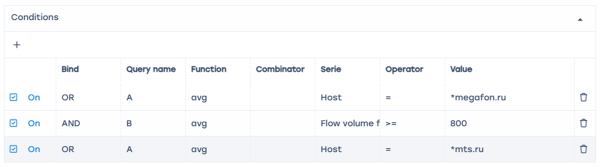
- Add 3 “+” fields
- First field — select table “A”; Link – “OR”; Function – “avg”; Series Host = *megafon.ru (or your competitor)
- Second field — select table “B”; Link – “AND”; Function – “avg”; Series Flow volume from subscriber, Pct/s >= 800
Error handling

- “If no errors” — no data
- “If there is an error or timeout” — save last state
Actions
E-mail action
- Click to auto-fill the form
- Enter recipient email address in “To” field
Notification

- Click "</>" to auto-fill the form
- Select notification type — “Warning”
- A notification will be created in the SSG system
The report link can be obtained from the notifications menu.
Select the notification Click Details
Follow the report link — it will open in a new browser window.
HTTP action
- Click "</>" to auto-fill the form
- Select the method suitable for your ticket system and enter the URL address
Was this information helpful?