


This is an old revision of the document!
Case 1. White Lists
Suppose it is necessary to restrict internet access for subscribers within specific LAC and TAC areas while preserving access to resources from a white list. In this case, PCRF Proxy replaces the standard PCRF policies for subscribers located in the specified zones.
As a result, special rules are automatically applied when a subscriber enters such a zone, and standard policies are restored when the subscriber leaves it.
To implement this case, PCRF Proxy must operate in Gx Proxy mode.
The configuration sequence for this case is described below.
Step 1. Creating a Base Station List
A base station list is formed from identifiers of different base station types: APN, TAC (4G), LAC (2G/3G), CI (2G Cell ID), SAC (3G), RAC (3G), ECI (4G Cell).
Base station lists are displayed and created in the "Zones" section on the "Lists" tab.
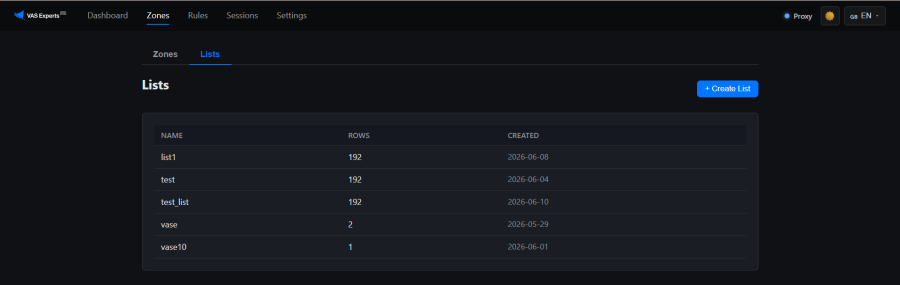
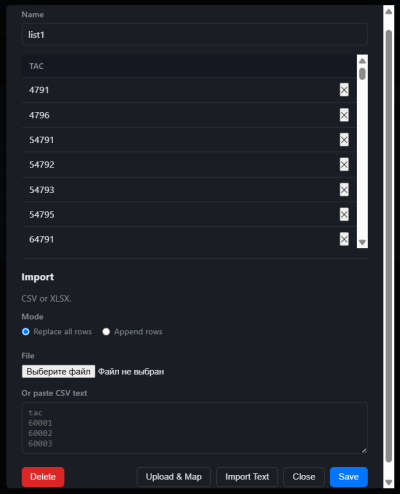
Click "+ Create List". Specify the list name. Open the created list. Select the import mode: "Replace All Rows" (all current list contents will be replaced with new data) or "Add Rows" (new data will be added to the existing list contents).
The list can be populated in two ways: paste CSV text or upload a CSV or XLSX file:
Method 1. Importing CSV Text
- Paste CSV text into the input field.
Example:tac 60001 60002 60003
- Click "Import Text" and then "Save"
Method 2. Importing a CSV or XLSX File
- Click "Browse File" and select the appropriate file
- Click "Upload and Map"
- Map the file columns to zones.
Available zone types:- APN — selective application of restrictions only to specific access points (for example, blocking general internet access while allowing service traffic).
- TAC (4G) — blocking subscribers within an LTE tracking area (city, district, or major transportation hub).
- LAC (2G/3G) — blocking subscribers within a geographic service area of legacy networks.
- CI (2G Cell ID) — restricting connectivity at the level of a specific GSM cell site.
- SAC (3G) — blocking subscribers within the coverage area of a specific 3G service area.
- RAC (3G) — narrowing an LAC-based restriction to a specific 3G routing area.
- ECI (4G Cell) — targeted restriction at the level of a specific LTE base station or antenna sector.
- Click "Import"
When multiple columns are mapped simultaneously, they are processed using logical AND semantics — a record is included in the zone only if all specified column values match. For example, if the file contains TAC = 1 and APN = internet, only subscribers matching both TAC = 1 and APN = internet will be included in the zone.
Example of TAC values imported from a file:
Step 2. Creating a Rule List
A rule list is an ordered set of instructions used to control traffic, bandwidth, and charging. If the rules are predefined on the PCEF, it is sufficient to specify the rule name so that the PCEF can determine the corresponding parameters.
Rule lists are displayed and created in the "Rules" section.
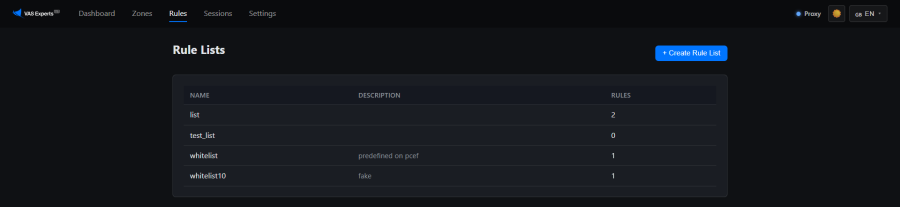
- Click "+ Create Rule List"
- In the dialog box, specify the list name and description (optional)
The list can be populated in several ways: paste or import a JSON array from a file, upload a CSV/XLSX file, or manually add rules through a dedicated form.
Method 1. JSON Array
Paste a JSON array into the input field or upload a JSON file.
This method is available both when creating and editing a rule list via the "Import JSON" button.
Required fields:
name— Charging-Rule-Name
Optional fields:
rating_group— charging key (integer)service_id,precedence,online,offlinemetering_method,qci,reporting_levelflow_status,flow_direction,flow_descriptionmbr_ul,mbr_dl,gbr_ul,gbr_dl
Example:
[{"name":"youtube","rating_group":100}]
Method 2. CSV/XLSX File
Click the "Upload CSV/XLSX" button and upload a file containing rules.
This method is available when editing a rule list.
Example file content:
tac
60001
60002
60003
Method 3. Manual Addition
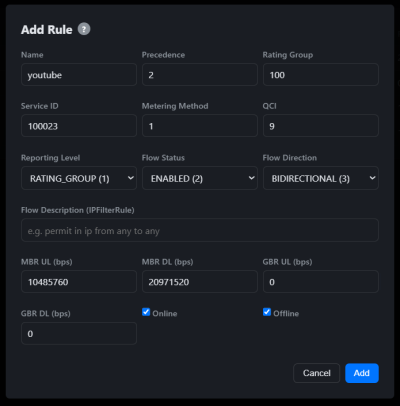
Click the "+ Add Rule" button and manually enter individual rules.
This method is available when editing a rule list.
Required fields:
- Name — Charging-Rule-Name (unique identifier)
Optional fields:
- Rating Group — charging key for OCS/OFCS
- Precedence — rule evaluation order (lower value = evaluated first)
- Service ID — service identifier
- Metering Method — 0=DURATION, 1=VOLUME, 2=BOTH
- QCI — QoS Class Identifier (1-9)
- Reporting Level — 0=SERVICE_ID, 1=RATING_GROUP, 2=SPONSORED
- Flow Status — gate: 0=UL, 1=DL, 2=both, 3=removed
- Flow Direction — 0=unspec, 1=DL, 2=UL, 3=bidirectional
- Flow Description — IPFilterRule (e.g. "permit in ip from any to any")
- MBR UL/DL — maximum bitrate (bps)
- GBR UL/DL — guaranteed bitrate (bps)
- Online/Offline — online/offline charging
Example:
Step 3. Creating a Zone
A zone is an entity formed from lists of base station identifiers of different types and associated with a specific rule list.
Zones are displayed and created in the "Zones" section on the "Zones" tab.
By default, the "local" zone is created — it contains the base rules for local/proxy_local modes. It is activated by proxy configuration, not manually.
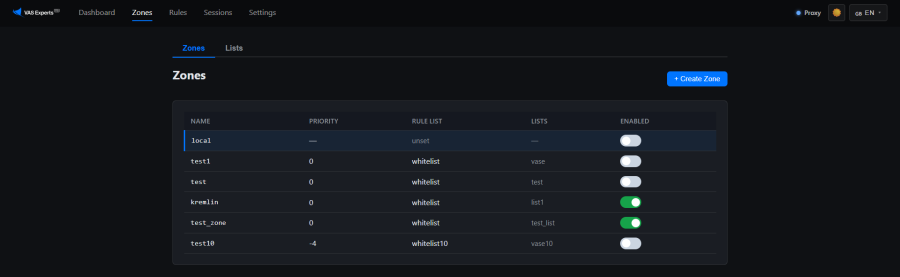
- Click "+ Create Zone"
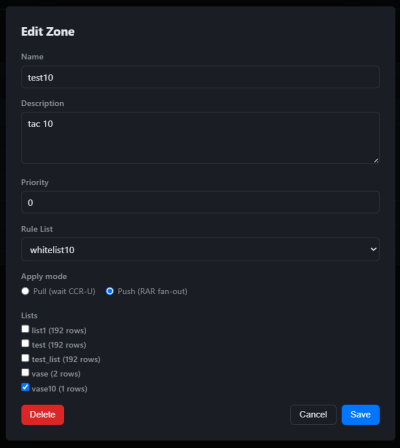
- In the dialog box:
- Specify the zone name
- Specify a description (optional)
- Set the priority
- Select the rule list for the zone
- Select the application mode:
Pull — wait for a Gx update and then apply the rule list to subscribers;
Push — immediately apply the rule list to subscribers via RAR when the zone is enabled - Select the lists that will be included in the zone
Example:
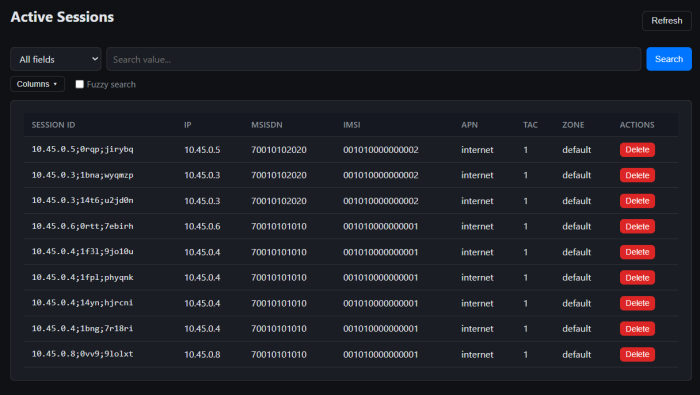
Session Monitoring
The "Sessions" section contains information about all active sessions.
Event-Trigger Settings
The "Settings" section is used to select the Event-Trigger values that PCRF Proxy sends over the Gx interface.
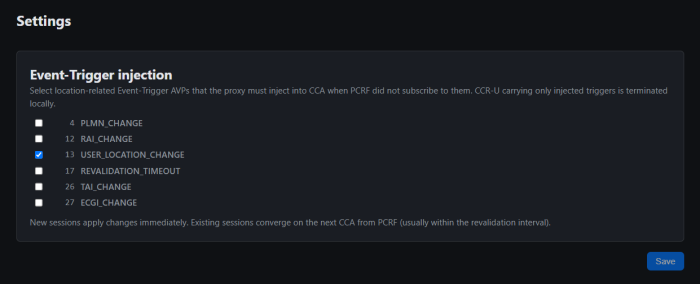
Event-Triggers define events upon which the PCEF sends updates over the Gx interface. PCRF Proxy uses these notifications to promptly recalculate and update policies, for example when a subscriber's location changes or when a configured timer expires.
The system automatically separates triggers into "inherited" (from the PCRF) and "local" (from PCRF Proxy) to avoid duplicate requests in the network:
- Requests from the real PCRF: If the actual PCRF has already configured the required trigger, the proxy does not duplicate it. All updates received from the PCEF for this trigger are transparently forwarded to the PCRF.
- Proxy-generated requests: If the system requires a trigger that is absent in the PCRF response, the proxy adds it to outgoing CCA messages.
- Local event processing: Updates received from the PCEF for such proxy-generated triggers are intercepted and processed locally by the proxy without creating additional load on the real PCRF.
Available Event-Triggers:
- 4 PLMN_CHANGE — operator network change (the subscriber moved to another mobile operator's network or entered international roaming)
- 12 RAI_CHANGE — routing area code change (the subscriber moved to another 2G/3G network area)
- 13 USER_LOCATION_CHANGE — any change in subscriber location (base station or network sector change)
- 17 REVALIDATION_TIMEOUT — policy validity timeout expiration (request to the PCRF to refresh policy and charging information based on a timer)
When enabled, the timeout value can be configured:

- 26 TAI_CHANGE — tracking area code change (the subscriber moved to another large LTE/4G network area)
- 27 ECGI_CHANGE — LTE cell change (the subscriber switched to another 4G base station)
Was this information helpful?