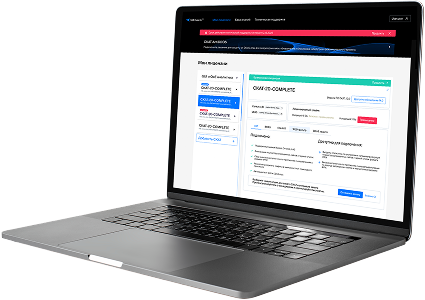
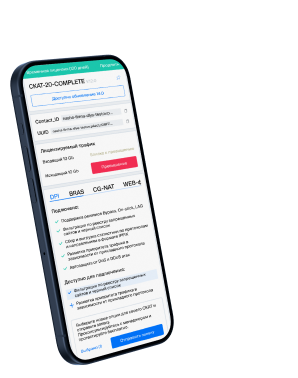
List of protocols
- Built-in protocols — updated along with the SSG software version. Installing a new version requires a DPI reboot, which causes traffic interruption.
If needed, they can be supplemented with up-to-date attributes from the VAS Cloud. This is only necessary for complex protocols, but the option is available for all. - Cloud protocols created by VAS Experts — are periodically updated from the VAS Cloud. This ensures that popular applications remain up-to-date as their behavior changes. Description
- Custom (user-defined) protocols — protocols created by users via the GUI using VAS Cloud tools. These have higher priority than those loaded from the VAS Cloud, and within them, IP:PORT takes precedence over IP and CIDR. It is possible to add a protocol based on IP, SNI, or AS. Guide.
- DSL protocols — protocols described in the DSL language and connected to DPI as a separate module, without reinstalling the software or causing traffic interruption. Unlike custom protocols, a DSL protocol is a finite state machine that analyzes the first N packets of a flow against defined conditions (ports, AS numbers, payload bytes, DSL expressions) and determines whether the flow matches the protocol.
DSL protocols are created by VAS Experts specialists upon client request to Technical Support.
| Protocol | ID | DPI version | Protocol group | Protocol type | Update | Description |
|---|---|---|---|---|---|---|
| mbus | 47000 | 12.2 | Unknown | Built-in | As needed | mbus operates on port 47000 and enables lightweight message bus communication in embedded or smart device systems. |
| winrm | 47001 | 12.2 | Unknown | Built-in | As needed | winrm operates on port 47001 and is used by Windows Remote Management (WinRM) for remote administration over the WS-Management protocol. |
| jvl-mactalk | 47100 | 12.2 | Unknown | Built-in | As needed | jvl-mactalk operates on port 47100 and enables communication between MAC-based JVL industrial controllers. |
| dbbrowse | 47557 | 12.2 | Data bases | Built-in | As needed | DBBrowse protocol provides secure search and access to database schemas or indexed datasets. |
| directplaysrvr | 47624 | 12.2 | Unknown | Built-in | As needed | directplaysrvr operates on port 47624 and enables session coordination for DirectPlay-based multiplayer games. |
| ap | 47806 | 12.2 | Unknown | Built-in | As needed | AP protocol may refer to Application Proxy in enterprise firewalls or access control. |
| bacnet | 47808 | 12.2 | Unknown | Built-in | As needed | BACnet protocol used in building automation systems for HVAC, lighting, and access control. |
| nimcontroller | 48000 | 12.2 | Unknown | Built-in | As needed | nimcontroller operates on port 48000 and provides core control services for NIM infrastructure orchestration. |
| nimspooler | 48001 | 12.2 | Unknown | Built-in | As needed | nimspooler operates on port 48001 and manages print and job spooling in NIM (Network Installation Manager) systems. |
| nimhub | 48002 | 12.2 | Unknown | Built-in | As needed | nimhub operates on port 48002 and serves as a central communication hub in IBM NIM environments. |
| nimgtw | 48003 | 12.2 | Unknown | Built-in | As needed | nimgtw operates on port 48003 and enables gateway functionality for remote deployment in NIM systems. |
| nimbusdb | 48004 | 12.2 | Data bases | Built-in | As needed | NimbusDB protocol manages access to distributed, versioned, and encrypted data services. |
| nimbusdbctrl | 48005 | 12.2 | Data bases | Built-in | As needed | NimbusDBCtrl is a control plane protocol for secure NimbusDB multi-model databases. |
| 3gpp-cbsp | 48049 | 12.2 | Unknown | Built-in | As needed | 3GPP Cell Broadcast Service Protocol used for emergency alerts in mobile networks. |
| isnetserv | 48128 | 12.2 | Unknown | Built-in | As needed | isnetserv operates on port 48128 and supports infrastructure network services in ISNET platforms. |
| blp5 | 48129 | 12.2 | Unknown | Built-in | As needed | blp5 operates on port 48129 and supports Bloomberg data services, particularly for enhanced real-time market data feeds. |
| com-bardac-dw | 48556 | 12.2 | Unknown | Built-in | As needed | com-bardac-dw operates on port 48556 and is used by Bardac Drives for device communication in industrial automation networks. |
| iqobject | 48619 | 12.2 | Unknown | Built-in | As needed | iqobject operates on port 48619 and enables communication with IQObject data systems for analytics or telemetry. |
| matahari | 49000 | 12.2 | Unknown | Built-in | As needed | matahari operates on port 49000 and is used in Matahari infrastructure for agent-based system monitoring and control. |
| DirectDownloadLink | 49152 | 12.2 | Unknown | Built-in | As needed | directdownloadlink operates on port 49152 and facilitates direct HTTP-based file transfers between clients. |
Was this information helpful?