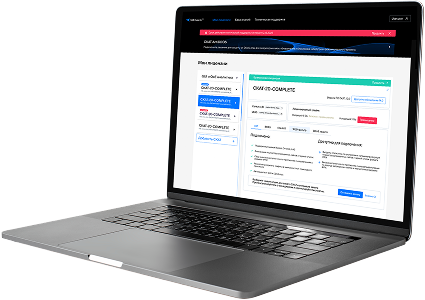
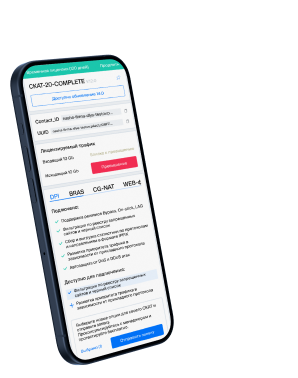
List of protocols
- Built-in protocols — updated along with the SSG software version. Installing a new version requires a DPI reboot, which causes traffic interruption.
If needed, they can be supplemented with up-to-date attributes from the VAS Cloud. This is only necessary for complex protocols, but the option is available for all. - Cloud protocols created by VAS Experts — are periodically updated from the VAS Cloud. This ensures that popular applications remain up-to-date as their behavior changes. Description
- Custom (user-defined) protocols — protocols created by users via the GUI using VAS Cloud tools. These have higher priority than those loaded from the VAS Cloud, and within them, IP:PORT takes precedence over IP and CIDR. It is possible to add a protocol based on IP, SNI, or AS. Guide.
- DSL protocols — protocols described in the DSL language and connected to DPI as a separate module, without reinstalling the software or causing traffic interruption. Unlike custom protocols, a DSL protocol is a finite state machine that analyzes the first N packets of a flow against defined conditions (ports, AS numbers, payload bytes, DSL expressions) and determines whether the flow matches the protocol.
DSL protocols are created by VAS Experts specialists upon client request to Technical Support.
| Protocol | ID | DPI version | Protocol group | Protocol type | Update | Description |
|---|---|---|---|---|---|---|
| netspeak-cs | 21847 | 12.2 | Unknown | Built-in | As needed | netspeak-cs operates on port 21847 and supports Call Signaling services in NetSpeak systems. |
| netspeak-acd | 21848 | 12.2 | Unknown | Built-in | As needed | netspeak-acd operates on port 21848 and provides Automatic Call Distribution communication in NetSpeak environments. |
| netspeak-cps | 21849 | 12.2 | Unknown | Built-in | As needed | netspeak-cps operates on port 21849 and enables centralized provisioning and session control in NetSpeak infrastructure. |
| snapenetio | 22000 | 12.2 | Unknown | Built-in | As needed | snapenetio operates on port 22000 and supports Snapenet I/O for input/output operations in Snapenet systems. |
| optocontrol | 22001 | 12.2 | Unknown | Built-in | As needed | optocontrol operates on port 22001 and supports communication and control for OptoControl automation systems. |
| optohost002 | 22002 | 12.2 | Unknown | Built-in | As needed | optohost002 operates on port 22002 and enables communication with OptoHost node 2 in industrial control systems. |
| optohost003 | 22003 | 12.2 | Unknown | Built-in | As needed | optohost003 operates on port 22003 and provides services for OptoHost industrial control system node 3. |
| optohost004 | 22004 | 12.2 | Data transfer | Built-in | As needed | OptoHost004 protocol supports remote diagnostics and control in secure industrial automation. |
| dcap | 22125 | 12.2 | Unknown | Built-in | As needed | dcap operates on port 22125 and supports DCAP (Data Copy Access Protocol) for data transfer in distributed systems. |
| gsidcap | 22128 | 12.2 | Unknown | Built-in | As needed | gsidcap operates on port 22128 and enables access to secure digital capture systems in GSID environments. |
| wnn6 | 22273 | 12.2 | Unknown | Built-in | As needed | wnn6 operates on port 22273 and is used by the Wnn6 Japanese input system for communication between client and language processing services. |
| cis | 22305 | 12.2 | Unknown | Built-in | As needed | CIS protocol used in Critical Infrastructure Security or utility monitoring platforms. |
| cis-secure | 22343 | 12.2 | Unknown | Built-in | As needed | Secure variant of CIS protocol used in regulated infrastructure communications. |
| WibuKey | 22347 | 12.2 | Unknown | Built-in | As needed | wibukey operates on port 22347 and is used by WibuKey software for secure license key management and hardware dongle authentication. |
| CodeMeter | 22350 | 12.2 | Unknown | Built-in | As needed | codemeter operates on port 22350 and is used by Wibu CodeMeter for software license management and secure encryption services. |
| caldsoft-backup | 22537 | 12.2 | Unknown | Built-in | As needed | CaldSoft Backup protocol used by a Brazilian backup and system restore platform. |
| vocaltec-phone | 22555 | 12.2 | Unknown | Built-in | As needed | vocaltec-phone operates on port 22555 and enables VoIP call signaling and control in VocalTec software-based telephony. |
| vocaltec-wconf | 22555 | 12.2 | Unknown | Built-in | As needed | vocaltec-wconf operates on port 22555 and supports web conferencing features for VocalTec VoIP or communication software. |
| talikaserver | 22763 | 12.2 | Unknown | Built-in | As needed | talikaserver operates on port 22763 and handles server-side operations for Talika software platforms, supporting data services or integrations. |
| aws-brf | 22800 | 12.2 | Unknown | Built-in | As needed | aws-brf operates on port 22800 and supports secure communication in AWS BRF (Broadcast Resilient Framework) deployments. |
Was this information helpful?