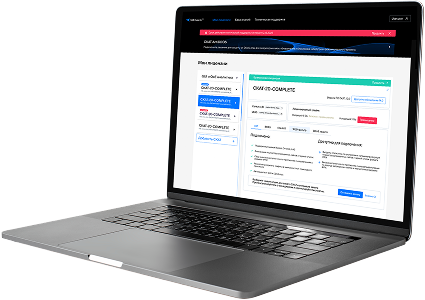
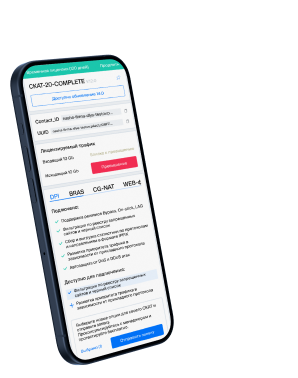
List of protocols
- Built-in protocols — updated along with the SSG software version. Installing a new version requires a DPI reboot, which causes traffic interruption.
If needed, they can be supplemented with up-to-date attributes from the VAS Cloud. This is only necessary for complex protocols, but the option is available for all. - Cloud protocols created by VAS Experts — are periodically updated from the VAS Cloud. This ensures that popular applications remain up-to-date as their behavior changes. Description
- Custom (user-defined) protocols — protocols created by users via the GUI using VAS Cloud tools. These have higher priority than those loaded from the VAS Cloud, and within them, IP:PORT takes precedence over IP and CIDR. It is possible to add a protocol based on IP, SNI, or AS. Guide.
- DSL protocols — protocols described in the DSL language and connected to DPI as a separate module, without reinstalling the software or causing traffic interruption. Unlike custom protocols, a DSL protocol is a finite state machine that analyzes the first N packets of a flow against defined conditions (ports, AS numbers, payload bytes, DSL expressions) and determines whether the flow matches the protocol.
DSL protocols are created by VAS Experts specialists upon client request to Technical Support.
| Protocol | ID | DPI version | Protocol group | Protocol type | Update | Description |
|---|---|---|---|---|---|---|
| fmsas | 16000 | 12.2 | Unknown | Built-in | As needed | fmsas operates on port 16000 and enables media services in FMSAS (Flexible Media Stream Aggregation System) environments. |
| fmsascon | 16001 | 12.2 | Unknown | Built-in | As needed | fmsascon operates on port 16001 and handles control channel operations in FMSAS streaming services. |
| gsms | 16002 | 12.2 | Unknown | Built-in | As needed | gsms operates on port 16002 and is used for management and monitoring in GSM-based communication infrastructures. |
| alfin | 16003 | 12.2 | Unknown | Built-in | As needed | ALFIN protocol used in financial or banking systems in Latin America. |
| jwpc | 16020 | 12.2 | Unknown | Built-in | As needed | jwpc operates on port 16020 and enables communication in JWPC (Java Web Processing Center) enterprise applications. |
| jwpc-bin | 16021 | 12.2 | Unknown | Built-in | As needed | jwpc-bin operates on port 16021 and provides binary data transport for JWPC backend processes. |
| sun-sea-port | 16161 | 12.2 | Unknown | Built-in | As needed | sun-sea-port operates on port 16161 and is used for Sun SEA (Service Endpoint Architecture) communication and control. |
| solaris-audit | 16162 | 12.2 | Debugging and measurement | Built-in | As needed | Solaris-Audit protocol provides encrypted audit data from Solaris OS components. |
| etb4j | 16309 | 12.2 | Unknown | Built-in | As needed | etb4j operates on port 16309 and is used by ETB4J for Java-based enterprise transaction bridging. |
| pduncs | 16310 | 12.2 | Unknown | Built-in | As needed | pduncs operates on port 16310 and supports PDUNCS for protocol data unit network control services. |
| pdefmns | 16311 | 12.2 | Unknown | Built-in | As needed | pdefmns operates on port 16311 and supports process definition and management in distributed engineering tools. |
| netserialext1 | 16360 | 12.2 | Unknown | Built-in | As needed | netserialext1 operates on port 16360 and facilitates remote serial device communication in networked systems. |
| netserialext2 | 16361 | 12.2 | Unknown | Built-in | As needed | netserialext2 operates on port 16361 and supports serial control signaling over IP in extended enterprise networks. |
| netserialext3 | 16367 | 12.2 | Unknown | Built-in | As needed | netserialext3 operates on port 16367 and enables extended serial-over-IP communication for legacy device support. |
| netserialext4 | 16368 | 12.2 | Unknown | Built-in | As needed | netserialext4 operates on port 16368 and allows serial data exchange over IP for device communication in industrial systems. |
| connected | 16384 | 12.2 | Unknown | Built-in | As needed | connected operates on port 16384 and is used by Connected services for establishing network connections or synchronization. |
| xoms | 16619 | 12.2 | Unknown | Built-in | As needed | xoms operates on port 16619 and is used for exchanging operational messages in enterprise monitoring or automation systems. |
| vtp | 16666 | 12.2 | Unknown | Built-in | As needed | vtp operates on port 16666 and is used for VLAN Trunking Protocol communications, enabling the propagation of VLAN configurations across switches |
| newbay-snc-mc | 16900 | 12.2 | Unknown | Built-in | As needed | newbay-snc-mc operates on port 16900 and is used by NewBay platforms for service network controller management. |
| sgcip | 16950 | 12.2 | Unknown | Built-in | As needed | sgcip operates on port 16950 and facilitates SGCIP (Smart Grid Control IP) for smart grid communication. |
Was this information helpful?