List of protocols
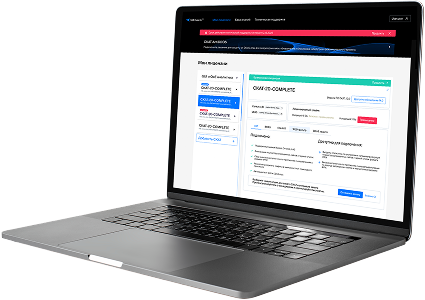
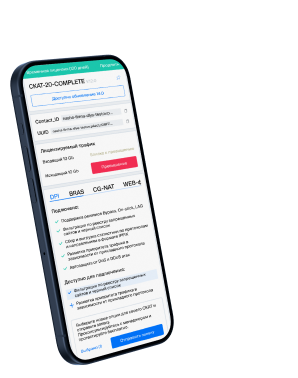
- Built-in protocols — updated along with the SSG software version. Installing a new version requires a DPI reboot, which causes traffic interruption.
If needed, they can be supplemented with up-to-date attributes from the VAS Cloud. This is only necessary for complex protocols, but the option is available for all. - Cloud protocols created by VAS Experts — are periodically updated from the VAS Cloud. This ensures that popular applications remain up-to-date as their behavior changes. Description
- Custom (user-defined) protocols — protocols created by users via the GUI using VAS Cloud tools. These have higher priority than those loaded from the VAS Cloud, and within them, IP:PORT takes precedence over IP and CIDR. It is possible to add a protocol based on IP, SNI, or AS. Guide.
- DSL protocols — protocols described in the DSL language and connected to DPI as a separate module, without reinstalling the software or causing traffic interruption. Unlike custom protocols, a DSL protocol is a finite state machine that analyzes the first N packets of a flow against defined conditions (ports, AS numbers, payload bytes, DSL expressions) and determines whether the flow matches the protocol.
DSL protocols are created by VAS Experts specialists upon client request to Technical Support.
| Protocol | ID | DPI version | Protocol group | Protocol type | Update | Description |
|---|---|---|---|---|---|---|
| pegasus | 9278 | 12.2 | Unknown | Built-in | As needed | pegasus operates on port 9278 and facilitates Pegasus for network management or monitoring services. |
| pegasus-ctl | 9279 | 12.2 | Unknown | Built-in | As needed | pegasus-ctl operates on port 9279 and supports Pegasus Control for managing Pegasus system operations. |
| pgps | 9280 | 12.2 | Unknown | Built-in | As needed | pgps operates on port 9280 and supports PGPS for secure communication, possibly related to PGP systems. |
| swtp-port1 | 9281 | 12.2 | Unknown | Built-in | As needed | swtp-port1 operates on port 9281 and supports primary communication for Secure Web Transfer Protocol (SWTP)-enabled applications. |
| swtp-port2 | 9282 | 12.2 | Unknown | Built-in | As needed | swtp-port2 operates on port 9282 and supports secondary port communication for Secure Web Transfer Protocol (SWTP) systems. |
| callwaveiam | 9283 | 12.2 | Unknown | Built-in | As needed | callwaveiam operates on port 9283 and is used by CallWave for internet-based voicemail or messaging alerts. |
| visd | 9284 | 12.2 | Unknown | Built-in | As needed | visd operates on port 9284 and supports visual display services or diagnostics in enterprise visualization systems. |
| n2h2server | 9285 | 12.2 | Unknown | Built-in | As needed | n2h2server operates on port 9285 and supports content filtering services using N2H2 technology. |
| n2receive | 9286 | 12.2 | Unknown | Built-in | As needed | n2receive operates on port 9286 and is used for receiving data in N2 protocol-based communication systems. |
| cumulus | 9287 | 12.2 | Unknown | Built-in | As needed | cumulus and cumulus-admin operate on ports 9287 and 8954 and manage data transfer and admin interfaces for Cumulus content management platforms. |
| armtechdaemon | 9292 | 12.2 | Unknown | Built-in | As needed | armtechdaemon operates on port 9292 and enables remote access and control for ARMTech hardware or secure embedded platforms. |
| storview | 9293 | 12.2 | Unknown | Built-in | As needed | storview operates on port 9293 and provides management access to storage systems via the StorView interface. |
| armcenterhttp | 9294 | 12.2 | Web browsing | Built-in | As needed | ARMCenter http Service, registered 2006-04 |
| armcenterhttps | 9295 | 12.2 | Web browsing | Built-in | As needed | ARMCenter https Service, registered 2006-04 |
| vrace | 9300 | 12.2 | Unknown | Built-in | As needed | vrace uses port 9300. No additional documentation found. |
| sphinxql | 9306 | 12.2 | Unknown | Built-in | As needed | sphinxql operates on port 9306 and enables SQL-like querying for the Sphinx full-text search engine. |
| sphinxapi | 9312 | 12.2 | Unknown | Built-in | As needed | sphinxapi operates on port 9312 and supports native API communication with the Sphinx search engine. |
| secure-ts | 9318 | 12.2 | Unknown | Built-in | As needed | secure-ts operates on port 9318 and supports Secure Transport Service for encrypted data transport. |
| guibase | 9321 | 12.2 | Unknown | Built-in | As needed | guibase operates on port 9321 and supports GUI communication in systems managing enterprise infrastructure or applications. |
| mpidcmgr | 9343 | 12.2 | Unknown | Built-in | As needed | mpidcmgr operates on port 9343 and provides manager-level communication for MPIDC data collection and diagnostics. |
Was this information helpful?