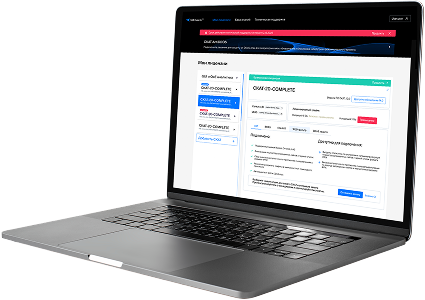
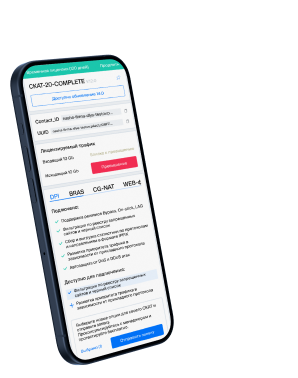
List of protocols
- Built-in protocols — updated along with the SSG software version. Installing a new version requires a DPI reboot, which causes traffic interruption.
If needed, they can be supplemented with up-to-date attributes from the VAS Cloud. This is only necessary for complex protocols, but the option is available for all. - Cloud protocols created by VAS Experts — are periodically updated from the VAS Cloud. This ensures that popular applications remain up-to-date as their behavior changes. Description
- Custom (user-defined) protocols — protocols created by users via the GUI using VAS Cloud tools. These have higher priority than those loaded from the VAS Cloud, and within them, IP:PORT takes precedence over IP and CIDR. It is possible to add a protocol based on IP, SNI, or AS. Guide.
- DSL protocols — protocols described in the DSL language and connected to DPI as a separate module, without reinstalling the software or causing traffic interruption. Unlike custom protocols, a DSL protocol is a finite state machine that analyzes the first N packets of a flow against defined conditions (ports, AS numbers, payload bytes, DSL expressions) and determines whether the flow matches the protocol.
DSL protocols are created by VAS Experts specialists upon client request to Technical Support.
| Protocol | ID | DPI version | Protocol group | Protocol type | Update | Description |
|---|---|---|---|---|---|---|
| trivnet1 | 8200 | 12.2 | Unknown | Built-in | As needed | trivnet1 operates on port 8200 and enables transaction processing and service integration in the Trivnet financial services platform. |
| trivnet2 | 8201 | 12.2 | Unknown | Built-in | As needed | trivnet2 operates on port 8201 and enables secure messaging or transactions in the second-tier Trivnet financial network platform. |
| aesop | 8202 | 12.2 | Unknown | Built-in | As needed | aesop operates on port 8202 and is used in education or scheduling platforms for communication between AESOP services. |
| lm-perfworks | 8204 | 12.2 | Unknown | Built-in | As needed | lm-perfworks operates on port 8204 and is used by License Manager Performance Works for performance optimization in LM systems. |
| lm-instmgr | 8205 | 12.2 | Unknown | Built-in | As needed | lm-instmgr operates on port 8205 and supports License Manager Instance Manager for managing license instances. |
| lm-dta | 8206 | 12.2 | Unknown | Built-in | As needed | lm-dta operates on port 8206 and facilitates License Manager Data for license data exchange in LM systems. |
| lm-sserver | 8207 | 12.2 | Unknown | Built-in | As needed | lm-sserver operates on port 8207 and is used by License Manager Sub-Server for secondary license management tasks. |
| lm-webwatcher | 8208 | 12.2 | Debugging and measurement | Built-in | As needed | LM-WebWatcher is a license monitoring protocol for web-enabled usage tracking. |
| rexecj | 8230 | 12.2 | Unknown | Built-in | As needed | rexecj operates on port 8230 and is used by Remote Execution Java for executing Java processes remotely. |
| synapse-nhttps | 8243 | 12.2 | Web browsing | Built-in | As needed | The NHTTPS transport uses two separate thread pools for mediating HTTPS requests and responses through the Synapse mediation engine. |
| pando-sec | 8276 | 12.2 | Unknown | Built-in | As needed | pando-sec operates on port 8276 and provides secure communication for the Pando content delivery network. |
| synapse-nhttp | 8280 | 12.2 | Web browsing | Built-in | As needed | The NHTTP transport uses two separate thread pools for mediating HTTP requests and responses through the Synapse mediation engine. |
| blp3 | 8292 | 12.2 | Unknown | Built-in | As needed | Bloomberg LP Protocol 3 providing enhanced financial data delivery and messaging. |
| hiperscan-id | 8293 | 12.2 | Unknown | Built-in | As needed | hiperscan-id operates on port 8293 and enables ID transmission or management in HiperScan systems for high-speed scanning. |
| blp4 | 8294 | 12.2 | Unknown | Built-in | As needed | blp4 operates on port 8294 and is used by Bloomberg services for real-time financial data and messaging. |
| tmi | 8300 | 12.2 | Unknown | Built-in | As needed | tmi operates on port 8300 and supports telemetry messaging and integration for industrial or research-based data collection systems. |
| amberon | 8301 | 12.2 | Unknown | Built-in | As needed | Amberon protocol linked to IoT-enabled traffic management systems. |
| hub-open-net | 8313 | 12.2 | Unknown | Built-in | As needed | hub-open-net operates on port 8313 and enables node registration and communication in HubOpenNet frameworks. |
| tnp-discover | 8320 | 12.2 | Unknown | Built-in | As needed | tnp-discover operates on port 8320 and facilitates discovery of Transparent Network Protocol (TNP) devices on a local network. |
| tnp | 8321 | 12.2 | Unknown | Built-in | As needed | tnp operates on port 8321 and is used for Transparent Network Protocol communications, enabling low-latency data transmission. |
Was this information helpful?