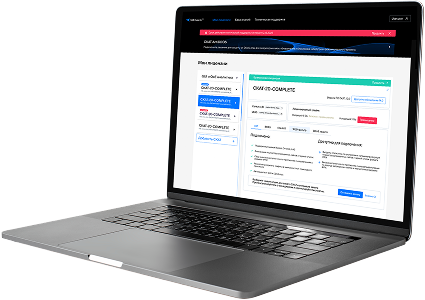
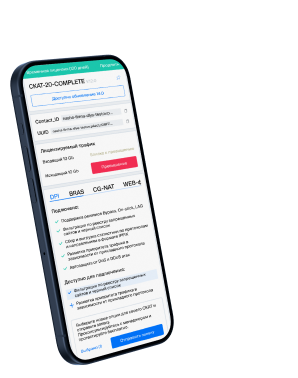
List of protocols
- Built-in protocols — updated along with the SSG software version. Installing a new version requires a DPI reboot, which causes traffic interruption.
If needed, they can be supplemented with up-to-date attributes from the VAS Cloud. This is only necessary for complex protocols, but the option is available for all. - Cloud protocols created by VAS Experts — are periodically updated from the VAS Cloud. This ensures that popular applications remain up-to-date as their behavior changes. Description
- Custom (user-defined) protocols — protocols created by users via the GUI using VAS Cloud tools. These have higher priority than those loaded from the VAS Cloud, and within them, IP:PORT takes precedence over IP and CIDR. It is possible to add a protocol based on IP, SNI, or AS. Guide.
- DSL protocols — protocols described in the DSL language and connected to DPI as a separate module, without reinstalling the software or causing traffic interruption. Unlike custom protocols, a DSL protocol is a finite state machine that analyzes the first N packets of a flow against defined conditions (ports, AS numbers, payload bytes, DSL expressions) and determines whether the flow matches the protocol.
DSL protocols are created by VAS Experts specialists upon client request to Technical Support.
| Protocol | ID | DPI version | Protocol group | Protocol type | Update | Description |
|---|---|---|---|---|---|---|
| brightcore | 5682 | 12.2 | Unknown | Built-in | As needed | BrightCore protocol used in smart building, HVAC, or IoT automation platforms. |
| coap | 5683 | 12.2 | Unknown | Built-in | As needed | coap operates on port 5683 and is the default port for the Constrained Application Protocol used in IoT device communications. |
| ggz | 5688 | 12.2 | Unknown | Built-in | As needed | ggz operates on port 5688 and supports communication in the GGZ Gaming Zone, an online multiplayer gaming infrastructure. |
| qmvideo | 5689 | 12.2 | Unknown | Built-in | As needed | qmvideo operates on port 5689 and supports QM Video for video streaming or management in QM systems. |
| rbsystem | 5693 | 12.2 | Unknown | Built-in | As needed | rbsystem operates on port 5693 and supports RBSystem for resource or backup system communication. |
| kmip | 5696 | 12.2 | Unknown | Built-in | As needed | kmip operates on port 5696 and supports key management operations in KMIP-compliant systems for cryptographic infrastructure. |
| proshareaudio | 5713 | 12.2 | Unknown | Built-in | As needed | proshareaudio operates on port 5713 and supports ProShare Audio for audio streaming in ProShare conferencing. |
| prosharevideo | 5714 | 12.2 | Unknown | Built-in | As needed | prosharevideo operates on port 5714 and is used by ProShare Video for video conferencing in Intel ProShare systems. |
| prosharedata | 5715 | 12.2 | Unknown | Built-in | As needed | prosharedata operates on port 5715 and is used by ProShare Data for sharing data in ProShare environments. |
| prosharerequest | 5716 | 12.2 | Unknown | Built-in | As needed | prosharerequest operates on port 5716 and supports ProShare Request for initiating ProShare collaboration sessions. |
| prosharenotify | 5717 | 12.2 | Unknown | Built-in | As needed | prosharenotify operates on port 5717 and facilitates ProShare Notify for sending notifications in ProShare systems. |
| dpm | 5718 | 12.2 | Unknown | Built-in | As needed | dpm operates on port 5718 and supports Data Protection Manager control services for backups and restore. |
| dpm-agent | 5719 | 12.2 | Unknown | Built-in | As needed | dpm-agent operates on port 5719 and manages backup agent communication in Microsoft Data Protection Manager. |
| ms-licensing | 5720 | 12.2 | Unknown | Built-in | As needed | ms-licensing operates on port 5720 and is used for terminal services client license validation in Windows environments. |
| dtpt | 5721 | 12.2 | Unknown | Built-in | As needed | dtpt operates on port 5721 and handles time synchronization messaging in distributed platforms. |
| msdfsr | 5722 | 12.2 | Unknown | Built-in | As needed | msdfsr operates on port 5722 and provides file replication services in Microsoft Distributed File System Replication (DFS-R). |
| omhs | 5723 | 12.2 | Unknown | Built-in | As needed | omhs operates on port 5723 and supports messaging in Open Message Handling Systems for enterprise-grade data exchange. |
| omsdk | 5724 | 12.2 | Unknown | Built-in | As needed | omsdk operates on port 5724 and supports management communication for Open Management SDK-based systems. |
| ms-ilm | 5725 | 12.2 | Unknown | Built-in | As needed | ms-ilm operates on port 5725 and supports synchronization and identity management in ILM (Identity Lifecycle Manager). |
| ms-ilm-sts | 5726 | 12.2 | Unknown | Built-in | As needed | ms-ilm-sts operates on port 5726 and enables secure token services for Microsoft Identity Lifecycle Manager. |
Was this information helpful?