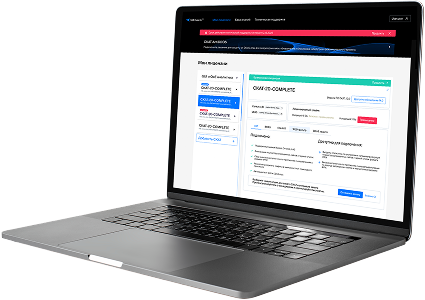
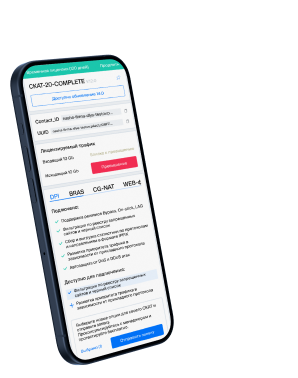
List of protocols
- Built-in protocols — updated along with the SSG software version. Installing a new version requires a DPI reboot, which causes traffic interruption.
If needed, they can be supplemented with up-to-date attributes from the VAS Cloud. This is only necessary for complex protocols, but the option is available for all. - Cloud protocols created by VAS Experts — are periodically updated from the VAS Cloud. This ensures that popular applications remain up-to-date as their behavior changes. Description
- Custom (user-defined) protocols — protocols created by users via the GUI using VAS Cloud tools. These have higher priority than those loaded from the VAS Cloud, and within them, IP:PORT takes precedence over IP and CIDR. It is possible to add a protocol based on IP, SNI, or AS. Guide.
- DSL protocols — protocols described in the DSL language and connected to DPI as a separate module, without reinstalling the software or causing traffic interruption. Unlike custom protocols, a DSL protocol is a finite state machine that analyzes the first N packets of a flow against defined conditions (ports, AS numbers, payload bytes, DSL expressions) and determines whether the flow matches the protocol.
DSL protocols are created by VAS Experts specialists upon client request to Technical Support.
| Protocol | ID | DPI version | Protocol group | Protocol type | Update | Description |
|---|---|---|---|---|---|---|
| xprtld | 5634 | 12.2 | Unknown | Built-in | As needed | xprtld operates on port 5634 and is used for remote export or license delivery in specialized software systems. |
| sfmsso | 5635 | 12.2 | Unknown | Built-in | As needed | sfmsso operates on port 5635 and facilitates SFM SSO for single sign-on in secure file management systems. |
| sfm-db-server | 5636 | 12.2 | Data bases | Built-in | As needed | SFM-DB-Server handles secure form data management and storage in workflow systems. |
| cssc | 5637 | 12.2 | Unknown | Built-in | As needed | cssc operates on port 5637 and provides secure communication for CSSC (Control System Support Communication). |
| flcrs | 5638 | 12.2 | Unknown | Built-in | As needed | flcrs operates on port 5638 and supports control and data services in FLCRS (Fast Lightweight Communication and Routing System). |
| ics | 5639 | 12.2 | Unknown | Built-in | As needed | ics operates on port 5639 and is used for Integrated Control Systems or industrial protocol communication. |
| vfmobile | 5646 | 12.2 | Unknown | Built-in | As needed | vfmobile operates on port 5646 and supports data transfer and synchronization for VF Mobile applications or devices. |
| filemq | 5670 | 12.2 | Unknown | Built-in | As needed | filemq operates on port 5670 and supports FileMQ for message queuing and file transfer services. |
| zre-disc | 5670 | 12.2 | Unknown | Built-in | As needed | zre-disc operates on port 5670 and is used by the ZRE (ZeroMQ Realtime Exchange) protocol for peer discovery in distributed systems. |
| amqps | 5671 | 12.2 | Unknown | Built-in | As needed | Secure version of AMQP using TLS encryption for secure messaging. |
| amqp | 5672 | 12.2 | Unknown | Built-in | As needed | Advanced Message Queuing Protocol for standardized message-oriented middleware. |
| jms | 5673 | 12.2 | Unknown | Built-in | As needed | jms operates on port 5673 and enables messaging services in Java Message Service-based enterprise applications. |
| hyperscsi-port | 5674 | 12.2 | Unknown | Built-in | As needed | hyperscsi-port operates on port 5674 and is used for iSCSI-like communication over Ethernet in HyperSCSI storage transport systems. |
| v5ua | 5675 | 12.2 | Unknown | Built-in | As needed | v5ua operates on port 5675 and is used for transporting V5.2 interface messages over IP networks, enabling signaling between access and core telecom systems. |
| raadmin | 5676 | 12.2 | Unknown | Built-in | As needed | raadmin operates on port 5676 and supports RA Admin for remote administration services. |
| questdb2-lnchr | 5677 | 12.2 | Data bases | Built-in | As needed | QuestDB2-Lnchr manages secure launch and session control for Quest Software’s DB2 tools. |
| rrac | 5678 | 12.2 | Unknown | Built-in | As needed | rrac operates on port 5678 and supports remote RAC (Remote Access Controller) management. |
| dccm | 5679 | 12.2 | Unknown | Built-in | As needed | dccm operates on port 5679 and facilitates DCCM (Distributed Configuration and Control Manager) for system control. |
| auriga-router | 5680 | 12.2 | Unknown | Built-in | As needed | auriga-router operates on port 5680 and facilitates routing and control traffic in Auriga platform infrastructures. |
| ncxcp | 5681 | 12.2 | Unknown | Built-in | As needed | ncxcp operates on port 5681 and is used by network-connected lighting or building control systems using NCXCP protocol. |
Was this information helpful?