Содержание
UDR (Usage Detail Record) Configuration
How it works
UDR (Usage Detail Record) — aggregated records of how much traffic, and of what kind, a subscriber transferred over a time interval, enriched with data from the subscriber session: login, IP address, network access server (NAS), and for mobile networks — IMSI, IMEI, radio access type, location, etc.
UDRs make it possible to link network activity to a specific subscriber and pass this data to external systems. Depending on the source of network data, two types of UDRs are generated:
- Session UDRs (SSL UDR) — based on Fullflow data;
- HTTP request UDRs (HTTP UDR) — based on Clickstream data on HTTP and HTTPS requests.
UDR generation is an optional feature and is disabled by default.
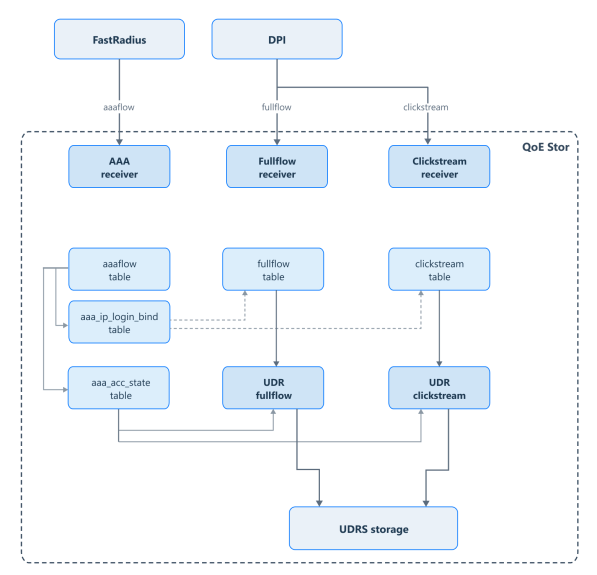
Data received from AAA receivers is written to the raw aaaflow table, which is created automatically when AAA receivers are configured. While data from the receivers is being inserted into aaaflow, the following tables are also populated:
aaa_ip_login_bind— used as a dictionary for linking and replacing the Login field in thefullflowandclickstreamtables.aaa_acc_state— subscriber session state. Subscriber data is taken from it into UDRs.aaa_udr_fullflow— session UDR table. Required for generating and exporting SSL UDRs (and other UDR types, depending on the filters applied).aaa_udr_clickstream— HTTP request UDR table. Required for generating and exporting HTTP UDRs, including those for HTTPS requests.
How records are generated:
- UDRs are populated automatically when Fullflow and Clickstream data is loaded; there is no separate calculation process.
- Subscriber data is taken from the
aaa_acc_statetable by the "login, subscriber IP address" pair. - The time of each record is rounded to the UDR interval — 15 minutes by default.
- UDRs are stored in hourly partitions. To read data from all cluster nodes, use the
aaa_udr_fullflow_distandaaa_udr_clickstream_disttables. - Population can be limited by a selection condition, for example, only certain protocols or subscribers.
Accumulated UDRs are exported to files one interval at a time, compressed (gzip), and placed in the /var/qoestor/backend/dump/udr_fullflow/success/ and /var/qoestor/backend/dump/udr_clickstream/success/ directories. The export is started by the administrator manually or on a schedule.
If the UDR_SCP parameter is set, the files are also sent via SCP to the specified directory on a remote server. Files that could not be sent are moved to the error/ subdirectory.
Configuration
UDR parameters are set in Administrator → QoE Stor configuration → AAA log settings or in the /var/qoestor/backend/.env file. When the file is edited manually, changes are applied differently:
- Population:
FILL_*,UDR_FULLFLOW_TIME_INTERVAL,UDR_CLICKSTREAM_TIME_INTERVAL— runfastor-reload-options - Schema:
UDR_FULLFLOW_CLICKSTREAM_JOIN,UDR_FULLFLOW_FILTER,UDR_CLICKSTREAM_FILTER,FILL_UDR_FULLFLOW_DIC_LIFETIME,FILL_UDR_FULLFLOW_DIC_LIMIT— runfastor-db-aaa-scheme - Export: all other
UDR_*parameters — nothing; the parameters are read on every export run
For the full list of parameters, see Parameter description.
Database schema
UDR generation and export require a dedicated database schema. It is installed with the command:
fastor-db-aaa-scheme
Run the command again after every change to the schema parameters: the volume retrieval mode, selection conditions, or dictionary parameters.
AAA receivers
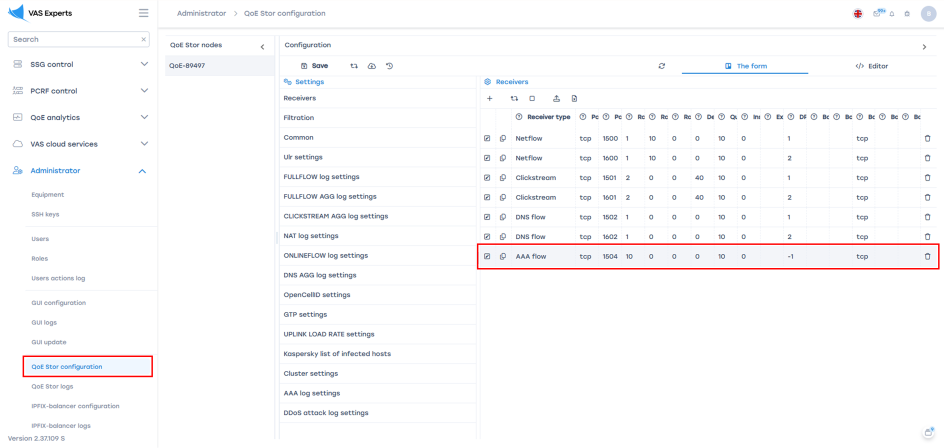
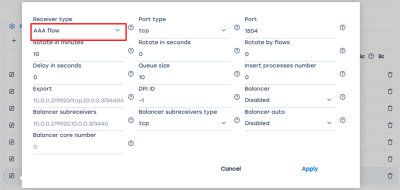
Add AAA receivers: in Administrator → QoE Stor configuration, create a receiver of the "AAA flow" type. Learn more about creating receivers
AAA logs
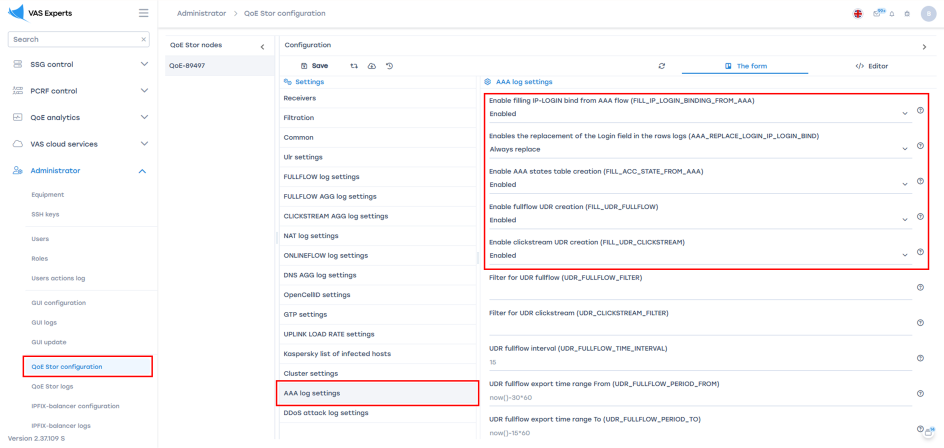
In Administrator → QoE Stor configuration → AAA log settings, configure the AAA logs.
Enable the FILL_IP_LOGIN_BINDING_FROM_AAA and AAA_REPLACE_LOGIN_IP_LOGIN_BIND parameters only if IP-to-Login binding is required on the QoE Stor side.
The following parameters must be enabled for UDR generation:
FILL_ACC_STATE_FROM_AAA— always;FILL_UDR_FULLFLOW— for session UDRs, and also for HTTP request UDRs with traffic volumes (modes1and2of theUDR_FULLFLOW_CLICKSTREAM_JOINparameter);FILL_UDR_CLICKSTREAM— for HTTP request UDRs. If only session UDRs are needed, do not enable this parameter.
Traffic volumes in HTTP request UDRs
Traffic volume, duration, and protocol for HTTP request UDRs are taken from session UDRs. The method is set by the UDR_FULLFLOW_CLICKSTREAM_JOIN parameter:
0(default) — volume, duration, and protocol are not filled in; the time is taken from the request time. Use it when only the requests themselves are needed1— data is taken by a direct join with session UDRs. Use it when volumes are needed and session UDRs are enabled2— data is taken from a dictionary that holds session UDRs for the current and previous intervals. Use it when volumes are needed; the dictionary size and refresh period must be set
For modes 1 and 2, FILL_UDR_FULLFLOW must be enabled. For mode 2, also enable FILL_UDR_FULLFLOW_DIC and set FILL_UDR_FULLFLOW_DIC_LIMIT and FILL_UDR_FULLFLOW_DIC_LIFETIME: with the default values (0), the dictionary stays empty.
Mode 2 configuration example:
UDR_FULLFLOW_CLICKSTREAM_JOIN=2
FILL_UDR_FULLFLOW_DIC=1
FILL_UDR_FULLFLOW_DIC_LIFETIME=60
FILL_UDR_FULLFLOW_DIC_LIMIT=5000000
The dictionary size and refresh period values in the example are for illustration only — choose them based on traffic volume and node memory.
After changing the mode, run fastor-db-aaa-scheme (see Database schema).
UDR export
 The instructions below apply only if UDR export is required
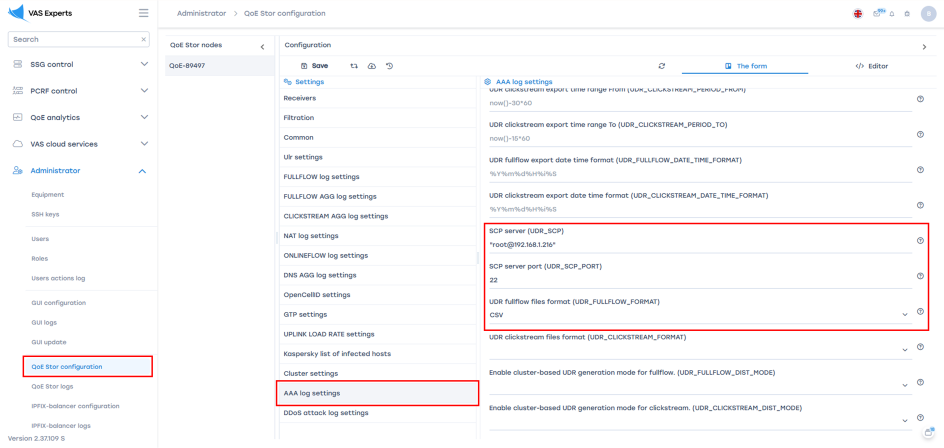
In Administrator → QoE Stor configuration → AAA log settings, configure the connection between QoE Stor and the UDR storage server using an SSH key.
- Specify the SCP server in the
UDR_SCPparameter - Specify the port in the
UDR_SCP_PORTparameter - Specify the directory on the server in the
UDR_SCP_DIRparameter - Set the export format in the
UDR_FULLFLOW_FORMATandUDR_CLICKSTREAM_FORMATparameters
Files are sent with the scp command without a password prompt, so key-based SSH login to the remote server must be configured for the user who runs the export. To check access:
ssh -p 22 udr@192.0.2.20 "ls /data/udr/"
If sending files to a remote server is not needed, do not set UDR_SCP — the files will remain in the success/ subdirectory on the QoE Stor server.
UDR export schedule
Installing the package does not create an export schedule. Configure the UDR export schedule in the root user's crontab on the QoE Stor server.
- Run
crontab -eand add two entries:*/15 * * * * sh /var/qoestor/backend/app_bash/aaa_udr/make_udr_fullflow.sh > /dev/null 2>&1 */15 * * * * sh /var/qoestor/backend/app_bash/aaa_udr/make_udr_clickstream.sh > /dev/null 2>&1
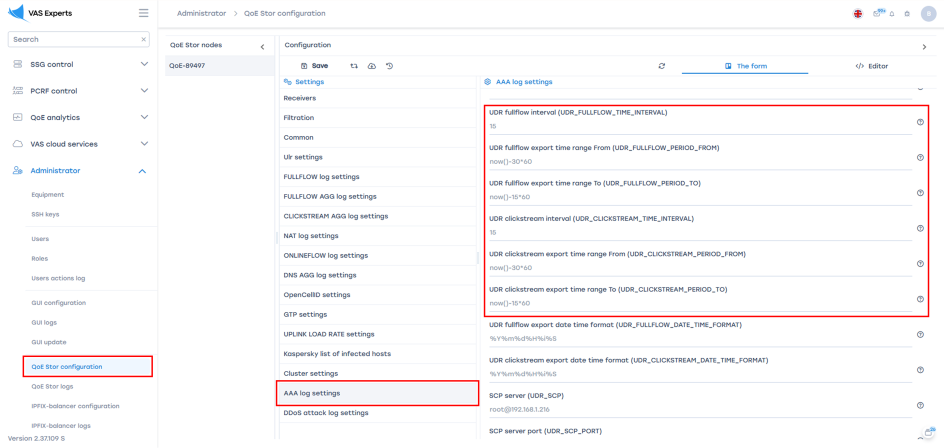
- In Administrator → QoE Stor configuration → AAA log settings, configure the data export:
- Set the aggregation interval: the period to which the time of UDR records is rounded. Default: 15 minutes. See
UDR_FULLFLOW_TIME_INTERVALandUDR_CLICKSTREAM_TIME_INTERVAL. It is recommended to set both intervals to the same value. - Set the time range: defines the start and end of the export period. See
UDR_FULLFLOW_PERIOD_FROM → UDR_FULLFLOW_PERIOD_TOandUDR_CLICKSTREAM_PERIOD_FROM → UDR_CLICKSTREAM_PERIOD_TO
The crontab run period must match the UDR interval: with the default settings, each run exports one previous completed interval. If the interval is changed, change the crontab period as well.
Creating UDR files manually
If a UDR file was not created, was generated with an error, or in other similar situations, you can create a UDR file manually.
Files are generated from the aaa_udr_fullflow and aaa_udr_clickstream tables, so UDRs can only be generated for a period that is still stored in these tables (see Storage).
The UDR creation script can be run manually. Without parameters, it exports the previous completed interval; a custom period is set with the --from and --to keys:
- For Clickstream UDRs:
sh /var/qoestor/backend/app_bash/aaa_udr/make_udr_clickstream.sh --from '2025-11-19 14:30:00' --to '2025-11-19 14:45:00'
- For Fullflow UDRs:
sh /var/qoestor/backend/app_bash/aaa_udr/make_udr_fullflow.sh --from '2025-11-19 14:45:00' --to '2025-11-19 15:00:00'
The script does not print anything to the console; the result is written to the log (see Checking and viewing UDRs).
UDRs can only be generated in blocks equal to the UDR interval (15 minutes by default), for example:
- 10:00 – 10:15;
- 10:15 – 10:30;
- 10:30 – 10:45, etc.
The file will be placed in the same directory as the automatically generated UDRs:
/var/qoestor/backend/dump/udr_clickstream/success/— for Clickstream UDRs;/var/qoestor/backend/dump/udr_fullflow/success/— for Fullflow UDRs.
The file is named after the interval start time in the YYYYMMDDHHMMSS format: SSL_<start>.dump.gz for Fullflow UDRs and HTTP_<start>.dump.gz for Clickstream UDRs. For example, for the period from 19.11.2025 14:45:00 to 19.11.2025 15:00:00, the Fullflow UDR file will be named SSL_20251119144500.dump.gz.
Storage
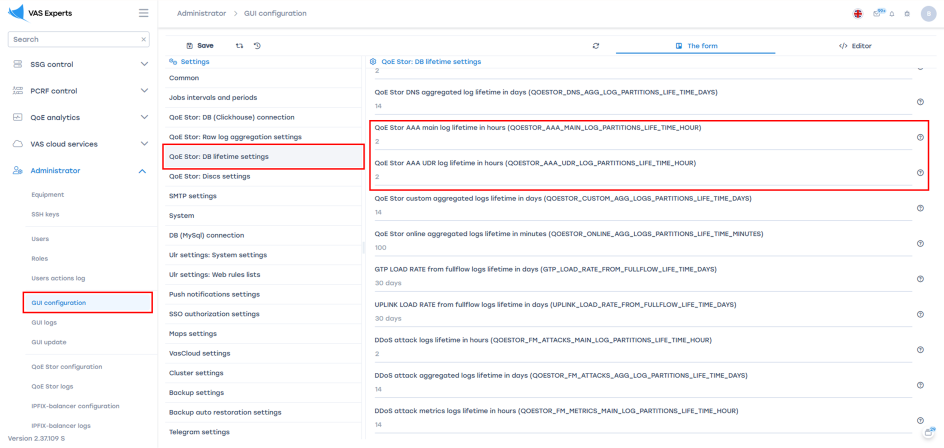
Storage can be limited with two parameters in Administrator → GUI configuration → QoE Stor: DB lifetime settings:
QOESTOR_AAA_MAIN_LOG_PARTITIONS_LIFE_TIME_HOUR— retention time of the raw AAA log, in hours. Default: 2 hours.QOESTOR_AAA_UDR_LOG_PARTITIONS_LIFE_TIME_HOUR— retention time of aggregated UDR logs, in hours. Default: 2 hours.
Files in the success/ and error/ directories are not deleted automatically — monitor free disk space and set up their cleanup.
Checking and viewing UDRs
Table population
After enabling population, wait for the next data load (every 10 minutes by default) and run:
clickhouse-client --query "select udr_time, count() from qoestor.aaa_udr_fullflow where udr_time > now() - 3600 group by udr_time order by udr_time"
clickhouse-client --query "select udr_time, count() from qoestor.aaa_udr_clickstream where udr_time > now() - 3600 group by udr_time order by udr_time"
Rows for the latest intervals should appear. If there are none, check that AAA events and Fullflow and Clickstream data are being received.
Export log
tail -n 20 /var/qoestor/backend/logs/udr_fullflow.log
tail -n 20 /var/qoestor/backend/logs/udr_clickstream.log
A successful export is indicated by the lines Dump made …, Dump gzip made … and Dump was sended to … (or Dump … to …/success/ if UDR_SCP is not set). Lines with the ERROR level indicate a query or compression failure.
The error/ directory should be empty: it receives files that could not be sent to the remote server. Once the cause is fixed, they can be sent manually.
Viewing UDR files
To view UDR files, go to the directory with the required UDR type on the QoE Stor server:
cd /var/qoestor/backend/dump/udr_clickstream/success/
Use zcat, zgrep, zless and other utilities for compressed files:
zcat HTTP_20260205150000.dump.gz
where HTTP_20260205150000.dump.gz is the UDR file name, with the interval start time in the YYYYMMDDHHMMSS format.
Command output:
In this example, the | character is used as the delimiter. The delimiter can be changed in the settings — see the Parameter description table for details on this parameter
[vasexpertsmnt@qoe02 success]$ zgrep 11223344550 HTTP_2026020515*
HTTP_20260205150000.dump.gz:|dpi02|11223344550||speedtest.tele2.net/10MB.zip|11198323|300628|117|GET|482129275|10.20.30.40|PGW-01-431|random-apn|192.168.111.123|6||10.0.2.112|speedtest.tele2.net|123456789012345|200|20260205151435|200|200|Mozilla/5.0 (iPhone CPU iPhone OS 26_2_1 like Mac OS X) AppleWebKit/605.1.15 (KHTML, like Gecko) CriOS/144.0.7559.95 Mobile/15E148 Safari/604.1|9876543212345678|11111|http://speedtest.tele2.net/|application/zip|||
Standard SSL traffic field template (aaa_udr_fullflow)
One record is generated per "subscriber, subscriber IP address, server IP address, host" combination per UDR interval.
| Column | Description |
|---|---|
| MSISDN | Subscriber login (MSISDN in mobile networks) |
| Subscriber IP | Subscriber IP address assigned in the mobile network |
| StartTime | Session start time. Unix Timestamp by default; the format is set by the UDR_FULLFLOW_DATE_TIME_FORMAT parameter |
| HostIP | Server IP address |
| Uplink Byte | Traffic volume sent by the subscriber (Uplink), in bytes |
| Downlink Byte | Traffic volume received by the subscriber (Downlink), in bytes |
| Domain name of SSL Cert | Domain name (Common Name or SNI) extracted from the SSL/TLS certificate or TLS ClientHello |
| EndTime | Session end time. Unix Timestamp by default; the format is set by the UDR_FULLFLOW_DATE_TIME_FORMAT parameter |
| Protocol ID | Numeric protocol identifier according to the protocol list |
| Application protocol | Name of the protocol detected by DPI, according to the protocol list |
Standard HTTP traffic field template (aaa_udr_clickstream)
| Column | Description |
|---|---|
| CDR entity | Record source |
| Rec entity | Name (hostname) of the DPI node that generated the record |
| MSISDN | Subscriber MSISDN |
| User ID | Internal identifier of the subscriber or user session |
| Dest | Full URL of the requested resource |
| Content size from term | Size of content sent from the server to the subscriber (Downlink), in bytes |
| Content size to term | Size of content sent from the subscriber to the server (Uplink), in bytes |
| URL duration | HTTP request or response processing time, in milliseconds |
| Method | HTTP request method |
| Charging ID | Unique identifier of the charging (Charging/GTP) session |
| NAS IP | IP address of the NAS, PGW, BNG, or other network node serving the subscriber session |
| NAS ID | Identifier of the NAS or access gateway |
| APN | Access Point Name used to establish the mobile session |
| SGSN IP | IP address of the SGSN or SGW serving the mobile session |
| RAT Type | Radio access type used to serve the subscriber |
| URL trigger | Reason for generating the Clickstream record |
| Src IP | Source IP address |
| Request Domain | Domain name from the URL |
| IMSI | International Mobile Subscriber Identity |
| Status | HTTP response status. Requires HTTP response parsing to be enabled (http_parse_reply=1) |
| Timestamp | Time the record was generated by DPI |
| Return code | Numeric HTTP response code. Requires HTTP response parsing to be enabled (http_parse_reply=1) |
| Failure reason | Reason for the HTTP request or response failure. Requires HTTP response parsing to be enabled (http_parse_reply=1) |
| User Agent | Value of the User-Agent HTTP header sent by the client device |
| IMEI | International Mobile Equipment Identity |
| RoamingOperatorID | Roaming operator network identifier (MCC+MNC of the visited network) |
| httpReqReferrer | Value of the Referer HTTP header |
| Content Type | MIME type of the transferred content from the HTTP response |
| Zoneid | Identifier of the logical zone, region, or DPI cluster |
| TrafficUsage | Traffic usage category determined by DPI |
| RoamingPlan | Identifier or name of the active roaming plan |
Traffic volumes and duration are filled in only if the UDR_FULLFLOW_CLICKSTREAM_JOIN parameter is 1 or 2 (see Traffic volumes in HTTP request UDRs).
Compact template
With UDR_CLICKSTREAM_TPL=1, HTTP request UDRs are generated with a compact set of fields:
- start and end time;
- MSISDN, IMSI, IMEI;
- protocol;
- host IP address and port;
- network protocol;
- radio access type (RAT Type);
- traffic volumes;
- APN;
- duration;
- subscriber IP address and port;
- SGSN IP;
- subscriber location (ULI);
- Request Domain;
- Dest.
By default, UDR files are generated using the templates above. Additional fields can be added on request to technical support.
Parameter description
| Parameter | Description | Values |
|---|---|---|
FILL_IP_LOGIN_BINDING_FROM_AAA | Enables the creation of an IP–Login dictionary from the AAA stream. | 1 — Enabled 0 — Disabled (default) |
AAA_REPLACE_LOGIN_IP_LOGIN_BIND | Enables replacement of the Login field in raw fullflow and clickstream logs based on AAA data. The FILL_IP_LOGIN_BINDING_FROM_AAA parameter must be enabled. | 1 — Always replace 2 — Replace only if Login is empty 0 — Disabled (default) |
FILL_ACC_STATE_FROM_AAA | Enables the creation of a subscriber session state table from AAA data. The table is required to populate the UDR tables for fullflow and clickstream. | 1 — Enabled 0 — Disabled (default) |
FILL_UDR_FULLFLOW | Enables the creation of the UDR table based on fullflow. The FILL_ACC_STATE_FROM_AAA parameter must be enabled. | 1 — Enabled 0 — Disabled (default) |
FILL_UDR_CLICKSTREAM | Enables the creation of the UDR table based on clickstream. The FILL_ACC_STATE_FROM_AAA parameter must be enabled; for modes 1 and 2 of UDR_FULLFLOW_CLICKSTREAM_JOIN, FILL_UDR_FULLFLOW must be enabled as well. | 1 — Enabled 0 — Disabled (default) |
UDR_FULLFLOW_CLICKSTREAM_JOIN | How clickstream UDRs get traffic volume, duration and protocol. After changing, run fastor-db-aaa-scheme. Changing the mode may delete accumulated UDRs. | 0 — Not filled (default) 1 — Join with fullflow UDRs 2 — Via the fullflow UDR dictionary |
FILL_UDR_FULLFLOW_DIC | Puts the latest fullflow UDRs into a dictionary. Required for UDR_FULLFLOW_CLICKSTREAM_JOIN=2. | 1 — Enabled 0 — Disabled (default) |
FILL_UDR_FULLFLOW_DIC_LIMIT | Maximum size of the fullflow UDR dictionary, in rows. If 0, the dictionary stays empty. After changing, run fastor-db-aaa-scheme. | Number of rows Default — 0 |
FILL_UDR_FULLFLOW_DIC_LIFETIME | Refresh period of the fullflow UDR dictionary, in seconds. After changing, run fastor-db-aaa-scheme. | Seconds Default — 0 |
REFRESH_UDR_FULLFLOW_DIC_BEFORE_CS | Refreshes the fullflow UDR dictionary before each clickstream data load. Applied without additional commands. | 1 — Enabled Not set by default |
UDR_FULLFLOW_FILTER | Filter for excluding unnecessary data (for example, by protocol) when creating fullflow-based UDRs. The filter is configured only by a specialist upon request to technical support. Important! After changing the filter, run fastor-db-aaa-scheme. | Not set by default |
UDR_CLICKSTREAM_FILTER | Filter for excluding unnecessary data (for example, by protocol) when creating clickstream-based UDRs. The filter is configured only by a specialist upon request to technical support. Important! After changing the filter, run fastor-db-aaa-scheme. | Not set by default |
UDR_FULLFLOW_PROTOCOL_FILTERUDR_CLICKSTREAM_PROTOCOL_FILTER | Filters records by protocol during UDR export. | Condition of the form having …Example: UDR_FULLFLOW_PROTOCOL_FILTER='having maxMerge(protocol_code) in (443)'Not set by default |
UDR_SCP | Server in the login@host format. If set, all created UDRs are sent via SCP to this server. Key-based authentication on the remote server must be configured beforehand. If not set, files remain on the QoE Stor server. | Example:UDR_SCP="root@192.168.1.216" |
UDR_SCP_PORT | SSH port of the remote server. | Default — 22 |
UDR_SCP_DIR | Directory on the remote server where UDRs are stored. | Example:UDR_SCP_DIR=/data/udr/ |
UDR_FULLFLOW_FORMAT | Format of the final Fullflow-based UDR files. | TabSeparated — fields are separated by tab characters (default) CSV — fields are separated by commas CustomSeparated — custom delimiter, set in UDR_FULLFLOW_FORMAT_CUSTOM_FIELD_DELIMETEROther ClickHouse output formats are also available |
UDR_CLICKSTREAM_FORMAT | Format of the final Clickstream-based UDR files. | TabSeparated — fields are separated by tab characters (default) CSV — fields are separated by commas CustomSeparated — custom delimiter, set in UDR_CLICKSTREAM_FORMAT_CUSTOM_FIELD_DELIMETEROther ClickHouse output formats are also available |
UDR_FULLFLOW_FORMAT_CUSTOM_FIELD_DELIMETER | Field delimiter in Fullflow-based UDR files. Applies only if UDR_FULLFLOW_FORMAT is set to CustomSeparated. | A character or character sequence in single quotes. Default — , (comma)Example: UDR_FULLFLOW_FORMAT_CUSTOM_FIELD_DELIMETER='|' |
UDR_CLICKSTREAM_FORMAT_CUSTOM_FIELD_DELIMETER | Field delimiter in Clickstream-based UDR files. Applies only if UDR_CLICKSTREAM_FORMAT is set to CustomSeparated. | A character or character sequence in single quotes. Default — , (comma)Example: UDR_CLICKSTREAM_FORMAT_CUSTOM_FIELD_DELIMETER='|' |
UDR_FULLFLOW_DATE_TIME_FORMAT | Date and time format in Fullflow-based UDR files. In the UI: UDR fullflow export date time format. | timestamp — Unix Timestamp (default)Custom format defined by a pattern. Example: UDR_FULLFLOW_DATE_TIME_FORMAT='%Y%m%d%H%i%S'Result: 20251119144500 |
UDR_CLICKSTREAM_DATE_TIME_FORMAT | Date and time format in Clickstream-based UDR files. In the UI: UDR clickstream export date time format. | timestamp — Unix Timestamp (default)Custom format defined by a pattern. Example: UDR_CLICKSTREAM_DATE_TIME_FORMAT='%Y%m%d%H%i%S'Result: 20251119144500 |
UDR_CLICKSTREAM_TPL | Compact record layout for clickstream UDRs (see Compact template). | 1 — Compact template Not set by default — main template |
UDR_FULLFLOW_DIST_MODEUDR_CLICKSTREAM_DIST_MODE | Cluster mode of UDR generation. In cluster mode, final UDRs are generated by a distributed query that aggregates data from all cluster nodes. | 1 — All cluster nodes 0 — Current node only (default) |
UDR_FULLFLOW_TIME_INTERVAL | UDR interval in minutes: the time of UDR records of both types is rounded to it, and the fullflow UDR export period is aligned to it. | Default — 15 minutes |
UDR_CLICKSTREAM_TIME_INTERVAL | Interval in minutes to which the clickstream UDR export period is aligned. It is recommended to set it equal to UDR_FULLFLOW_TIME_INTERVAL. | Default — 15 minutes |
UDR_FULLFLOW_PERIOD_FROM → UDR_FULLFLOW_PERIOD_TOUDR_CLICKSTREAM_PERIOD_FROM → UDR_CLICKSTREAM_PERIOD_TO | Time range for which UDR records are exported. | Start of period (From): now()-30*60 (default: 30 minutes ago)End of period (To): now()-15*60 (default: 15 minutes ago) |