Содержание
Session Policing
You can manage Session Policing in the GUI under SSG control → Services → Session Policings.
The process of configuring session policing consists of two steps:
- Creating a service profile and configuring policing within the profile: selecting protocols and assigning them priority (policing class) or speed.
- Overlaying a Policing Profile on a subscriber.
Creating and customizing the Service Profile
Create a profile to which we will then add protocols and configure policies.
One protocol can be added to different profiles, and one profile can be overlaid on multiple subscribers.
To create a profile, you need to perform the following actions on the corresponding panel:
- Press the + (Add Profile) button.
- Enter a profile name
- Save
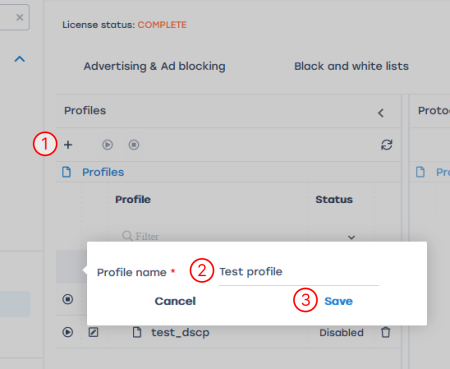
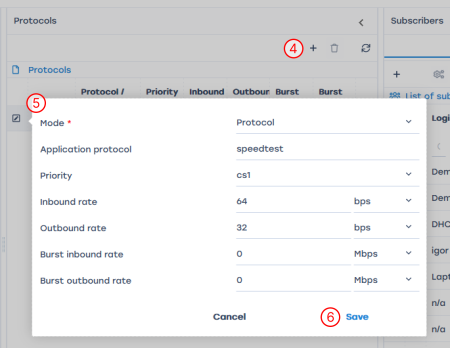
- Add the necessary protocols to the created profile: click the + (Add Protocol) button on the Protocols panel
- Fill in the details of the protocol/protocol group:
- Select Mode (Protocol or Protocols Group), fill in the name of the protocol or select the name of the group from the drop-down list
- Prioritize the selected protocol or group. There are two ways to do this: set the priority or rate.
Description of parameters:- The Priority parameter overrides the class with respect to global DSCP markup
- With the Inbound rate and Outbound rate parameters, you can set the traffic rate for a particular session
- The parameters Burst inbound rate and Burst outbound rate show what the short-term rate interruption equals
- Save
Applying Session Policing to a Subscriber
Before applying a profile to a subscriber, it is necessary to enable the profile by clicking on the "Start" icon to the left of the profile or above the profile table:

From the graphical interface, you can overlay a service profile on a subscriber in two ways:
You can apply session policing to a large list of subscribers at once via the console, the command syntax is described in the section Traffic policing management. Named policing profiles.
Per subscriber on the list
- Open the profile editing window
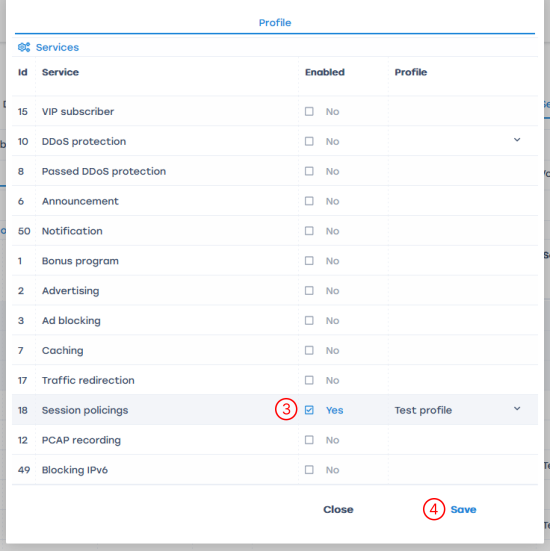
- Activate service 18 - Session Policings by clicking the checkbox next to it and select the desired profile
- Save

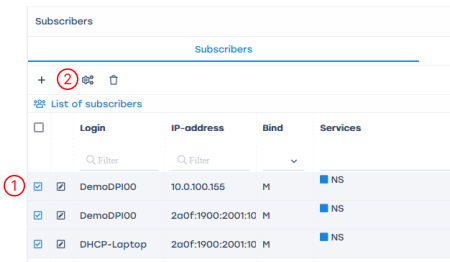
To multiple or all subscribers in the list
- Check the required subscribers or select the whole list using the checkbox in the table header.
- Open the service configuration window
- Activate service 18 - Session Policing by clicking the checkbox next to it and select the desired profile
- Save
In the debugging and testing mode, assigning services to a subscriber can be done in the GUI.
In industrial operation mode, it is recommended to do this with the help of billing: by the PUSH method or with Radius, and use the GUI to track the settings made.
In industrial operation mode, it is recommended to do this with the help of billing: by the PUSH method or with Radius, and use the GUI to track the settings made.